Project templates in Prosaas CRM help you standardize and streamline project creation by providing predefined structures that can be customized for specific projects. This feature is particularly valuable for organizations that frequently work on similar types of projects.
To create a new project template, navigate to "Projects" > "Templates" from the main menu and click the "+ New Template" button to access the template creation form.
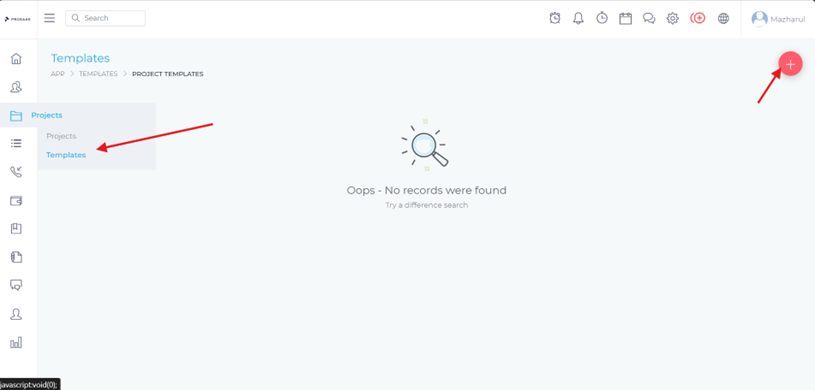
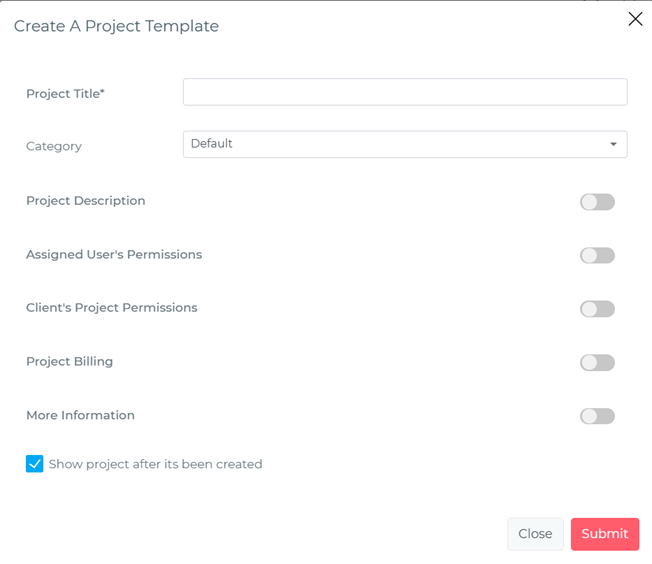
When creating a template, you'll define the standard structure that will be applied to future projects. This includes setting up:
Once you've configured all the template settings, save the template with a descriptive name that clearly identifies its purpose and use case.
When creating a new project, you can leverage existing templates to speed up the setup process. Select "Use Template" during project creation, then choose the appropriate template from the dropdown menu based on your project type and requirements.
After selecting a template, you can customize any specific details that are unique to this particular project instance. This allows you to maintain consistency while adapting to specific client needs or project variations. Once you've made the necessary customizations, save the project to begin working with your templated project structure.
